
Invoice
Access
Orders > Order > Order Detail > Invoice Detail
Requirements
Payment Capability
Stripe Integration Setup
Access to Invoice Resource
Properties
Basic Information
Invoice ID - System generated Invoice ID
Due Date - Invoice due date, system automatically mark as OVERDUE if this date has expired
Payment Method - Payment method
Payment Reference - Payment reference generated by the payment gateway
Status* - Please refer to Invoice Status section
Currency* - Invoice currency
Invoice amount - Invoice amount automatically calculated in Invoice’s currency
Invoice Address - Invoice address (appear in Invoice pdf)
Invoice Items
Description - User entered description
Product Name - Product name correspond to this line item
Qty* - Quantity of the line item
Unit Price - Unit price of the line item in invoice’s currency
Actions
Payment Link - Online payment link *1
Download PDF - Download pdf version of this Invoice *1
Invoice Status
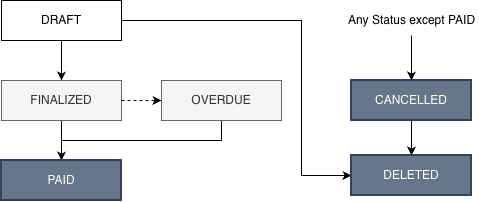
DRAFT - User able to edit
FINALIZED - Detail of Invoice confirmed and not editable anymore
PAID - Invoice has been paid by customer
OVERDUE - Invoice has due date specified and has expired
CANCELLED - Invoice no longer needed and has been cancelled by user
Remarks
A lock icon display at the end of the page title indicates the Invoice has been FINALIZED and can no longer be edited.
An Invoice cannot be deleted once finalized, if an Invoice is no longer needed, please use the “Cancel” function.
Negative invoice amount is not permitted.
*1 Available after Invoice has been FINAL:ZED